export CMAKE_CXX_COMPILER_LAUNCHER=ccache
ccache for C++ CMake projects

Author: Nikolai Kutiavin
At some point, every C++ project hits the same wall: build time. Switch Debug ↔ Release, enable sanitizers, or toggle a single CMake option — and your “quick change” turns into minutes of waiting.
You can fight it with precompiled headers, better dependency hygiene, or fewer includes. But when you want the biggest speedup per hour invested, caching is hard to beat.
In this article, you’ll learn:
- what ccache is (and what it is not),
- how cache hits actually happen,
- and the common setup mistakes that silently drop your hit rate to zero.
What ccache is
ccache doesn’t compile code on its own. Instead, it acts as a wrapper around the compiler.
If the cache has no entry for a translation unit, ccache falls back to normal compilation and then stores the result in the cache.
A typical CMake + ccache build looks like this:
- CMake configuration,
- running ccache instead of the real compiler,
- normal compilation on a cache miss,
- returning an object file from the cache on a cache hit,
- linking.
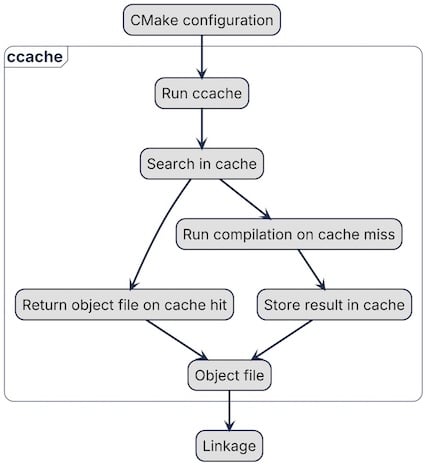
ccache speeds up the most expensive part of the build: compilation. If your project has heavy templates or compile-time computations, a cache hit means ccache returns a previously built object file instead of compiling again. That alone can significantly reduce build time.
ccache stores its cache in a dedicated directory. So even if you delete your build directory and rebuild from scratch, ccache can still reuse cached objects and skip compilation.
But ccache is only effective when your cache hit rate is high. To get that, you need to understand how ccache decides whether two compilations are “the same”. That’s what the next section covers.
How ccache works
The goal of ccache is to return the same object file the compiler would produce. To do that, it takes information about the compiler, compilation flags, and the source file and hashes it:
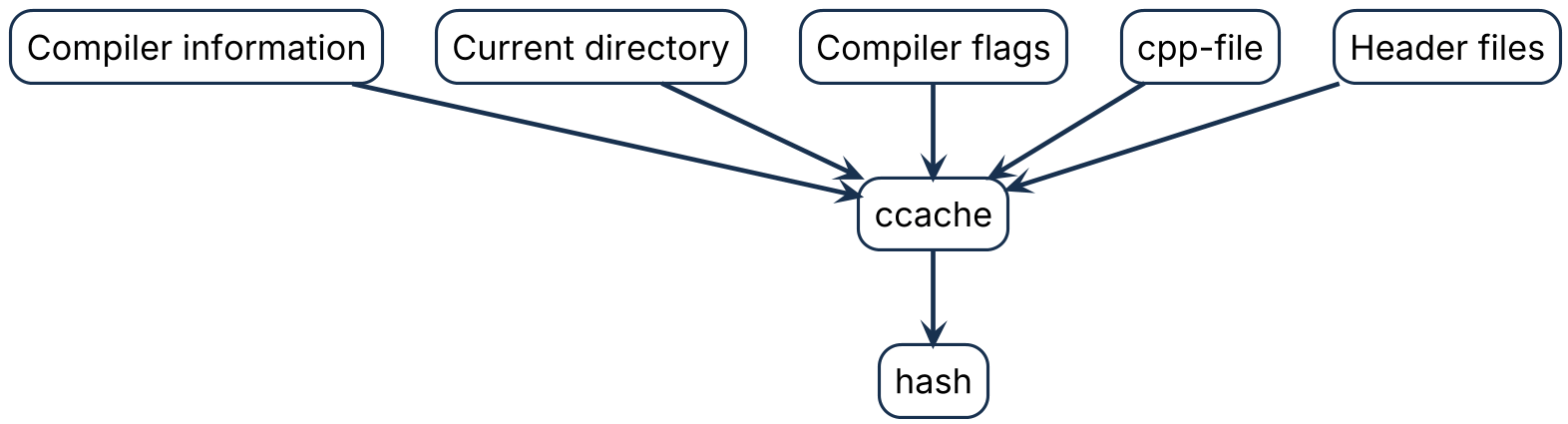
ccache has different modes: with a separate preprocessor step and without. But in both cases it tracks not only the compiled .cpp file, but also the included headers. If any header changes, the hash changes as well.
The cache can contain multiple entries for the same source file compiled with different flags (for example, Debug vs Release). This significantly accelerates switching build types or tweaking CMake options: instead of recompiling from scratch, ccache can return cached object files.
Cleanup happens when cache limits (max size or max number of files) are exceeded. ccache removes old entries using an LRU (least recently used) policy.
To use ccache, CMake needs to know about it — the next subsection shows how to set it up.
Set up ccache with CMake
Since CMake 3.17, you can set CMAKE_CXX_COMPILER_LAUNCHER to run ccache as a compiler wrapper. Set it globally, and CMake will invoke ccache instead of the regular compiler. For example, in ~/.profile:
You can also pass it during configuration:
cmake -DCMAKE_CXX_COMPILER_LAUNCHER=ccache -DCMAKE_BUILD_TYPE=Release ../
But doing it manually can be tedious and error-prone: one build uses ccache, another doesn’t. A global environment variable ensures every CMake build uses ccache by default.
If you need a custom ccache configuration, use CCACHE_CONFIGPATH to point to a config file:
export CCACHE_CONFIGPATH=/home/some/ccache.conf
In that file you can tune behavior, for example:
- set the maximum cache size,
- choose the mode (direct vs preprocessor),
- enable or disable cache compression,
- define the cache directory.
In many cases, the default configuration works well out of the box.
Integrating ccache with CMake is simple, but that doesn’t automatically mean your build will become faster. Misconfiguration, unstable build inputs, or frequently changing generated files can destroy your cache hit rate.
In the next section, we’ll look at the tools ccache provides to investigate cache misses and debug performance issues.
Debugging tools in ccache
ccache provides several tools to investigate cache misses: statistics and debug logs. It continuously collects counters for cache hits and misses, including:
- preprocessor calls,
- direct-mode hits,
- cache size and storage usage,
- cleanup events,
- total hits/misses,
- compilation failures,
- and many others.
Use ccache --show-stats to see the basic statistics. Add --verbose to get a larger set of counters:
$ ccache --show-stats --verbose
Cache directory:    /home/ubuntu/.cache/ccache
Config file:        /home/ubuntu/.config/ccache/ccache.conf
System config file: /etc/ccache.conf
Stats updated:      Wed Feb  4 19:48:56 2026
Cacheable calls:     53 /  53 (100.0%)
  Hits:              24 /  53 (45.28%)
    Direct:          24 /  24 (100.0%)
    Preprocessed:     0 /  24 ( 0.00%)
  Misses:            29 /  53 (54.72%)
Successful lookups:
  Direct:            24 /  53 (45.28%)
  Preprocessed:       0 /  29 ( 0.00%)
Local storage:
  Cache size (GiB): 0.0 / 5.0 ( 0.03%)
  Files:             58
  Hits:              24 /  53 (45.28%)
  Misses:            29 /  53 (54.72%)
  Reads:            106
  Writes:            58
Note that these counters are cumulative: they reflect all builds that ran before, not only the last one. If you’re experimenting and want clean numbers, reset the counters with:
ccache --zero-stats
This makes it much easier to see how a specific change affects the cache hit rate.
To understand what happened under the hood for a specific file, enable debug logging. You can turn it on in the config file or via the CCACHE_DEBUG environment variable.
When enabled, ccache generates extra files next to the object file. The most useful ones are:
- <objectfile>.<timestamp>.ccache-input-text — a human-readable summary of what went into the hash,
- <objectfile>.<timestamp>.ccache-log — a detailed log of the decisions ccache made.
The log explains the lookup process step by step, while *.ccache-input-text shows the inputs that were hashed. Comparing two *.ccache-input-text files is often the fastest way to identify what changed and why a cache miss occurred.
Common pitfalls for cache hits
Here are the most common pitfalls that reduce your cache hit rate — and how to fix them.
1) Cache is too small
If the cache storage is too limited, ccache is forced to evict entries even though the corresponding source files haven’t changed.
You’ll usually see this in the statistics: the cache is near its size limit and the number of cleanups is high.
Increase the cache size, for example to 10 GB:
max_size = 10G
2) __DATE__, __TIME__, __TIMESTAMP__
These macros are replaced by the preprocessor with the current time, which effectively changes the hash. As a result, ccache won’t find the cached object file even if the actual source code didn’t change.
To mitigate this, allow time macros via sloppiness:
sloppiness = time_macros
3) Architecture that amplifies rebuilds
The most harmful issue for cache hits is poorly enforced module boundaries. When modules expose implementation details through headers, a tiny change in one header can cascade into widespread rebuilds — and massive cache misses across the project.
If you want a deeper dive into what “proper boundaries” mean in C++ and how to enforce them via both the build system and code structure, I cover this in my book No More Helloworlds — Build a Real C++ App and in my monthly newsletter From Complexity to Essence in C++.
In practice this means: keeping public headers minimal and separated from private ones, moving implementation details to .cpp. Public headers are exposed with target_include_directories(PUBLIC) and private are hidden by target_include_directories(PRIVATE).
Conclusion
ccache is not a magic switch — it’s a multiplier.
If your build is already reasonably stable, ccache can turn “minutes of waiting” into seconds by reusing previously compiled object files.
But if your project constantly invalidates the compiler inputs (flags, paths, generated headers, time macros, or leaky module boundaries), ccache has nothing to reuse — and the hit rate drops to zero.
So the real workflow looks like this:
- Measure first (ccache --show-stats, --verbose)
- Fix the obvious killers (cache size, time macros, unstable inputs)
- Treat low hit rate as a signal — often it points to build-system and architecture issues, not to ccache itself.
Once you adopt that mindset, ccache becomes more than a speed tool: it becomes a feedback loop that rewards clean boundaries, reproducible builds, and disciplined CMake usage.
Thank you for subscribing!